
Securing your BC Services Card app and your identity
On this page:
Why you have to secure the app
Your privacy and security are important.
Securing the app prevents others from opening and using the app. For example, if your phone is lost, stolen, or shared with others.
It prevents others from:
- Impersonating you and using the app to access various services - such as health, tax or student loan information
- Seeing your information displayed in the app
- Making changes to your account
The BC Services Card app is different from other apps provided by the B.C. government - such as the Health Gateway app. They have their own security options.
Ways to secure the app
There are two options to secure the app. Both are never shared with us and never leave your mobile device. Do not respond to texts, emails, or phone calls requesting your device passcode. Email bcservicescard@gov.bc.ca to report it.
Option 1: Use the same security as your mobile device
You can use the way you unlock your mobile device. For example:
- A passcode, Touch ID or Face ID on an iPhone or iPad
- A password, pattern or fingerprint on an Android device
For people who always use a device passcode this is a good option to always keep their device secure. If you sometimes turn off the passcode, you must use a PIN instead.
If you use this option, then anyone that can unlock your mobile device can:
- See your identity information
- Access your data
- Access government services as you
- See your account information
Option 2: Use a PIN
Choose a PIN that is 6 digits long and can only used to open this app.
This is good for people who do not secure their mobile device with a passcode or sometimes turn it off. Make sure you remember your PIN.
How to change how you secure the app
You can always change how you secure the app. On the latest version of the BC Services Card app:
- Open the app
- Go to Menu in the top left corner
- Tap on Change app security
- Choose how you want to secure your app then follow the prompts that follow.
Securing a new mobile device
When you get a new mobile device, you need to set up the BC Services Card app again.
For each device, you can choose which way you want to secure the app. If you use a PIN, you can choose the same or a different PIN.
Forgot PIN?
The PIN you choose is never shared with us. It never leaves your device. If you cannot remember your PIN, we cannot help you get it or reset it.
You will need to:
- Remove the BC Services Card app from your mobile device
- Redownload the BC Services Card app
- Add your account - including verifying your identity
The app will ask you to create a new PIN when you add your account.
Read more on how to:
How to change your PIN
Using the latest version of the BC Services Card app:
- Open the app
- Go to Menu in the top left corner
- Tap on Change PIN
App reset when device passcode turned off
If you turn off the passcode on your mobile device, even temporarily, the app can no longer access the secure data for the BC Services Card app. You will need to set up the app again.
If you sometimes turn off the passcode, we recommend you use a PIN instead.
The app will not reset if you:
- Change your passcode
- Add or remove fingerprints
- Turn on or off your Face ID
Protecting your identity
Review your account activity
The BC Services Card program records when and how you use your card, the BC Services Card app, and the services you access. This information is available in your BC Services Card Account. You should log in to your account once a month to review where you have used the app and report any suspicious activity.
If you see activity that you do not recognize, contact us.
Lost or stolen devices
If you lost your mobile device, or it's been stolen, you can remove the app from that device. Learn how to remove the app from that device.
Do not respond to texts or emails asking for your personal information
We will never ask for your personal information by text or email unless you've contacted us. To set up the BC Services Card app, you will only be asked to enter your information in the app.
Do not respond to any texts or emails asking you for personal information. Email bcservicescard@gov.bc.ca to report it. If possible, include any screenshots, links to the website you're on, and what you're trying to do when you were prompted for the number.
Do not provide your credit card number - the app is free
You do not need a credit card. We will never ask you for your credit card number.
The BC Services Card app is free to download, set up and use. Only download the app from the official Apple App Store or Google Play Store.
If you're asked for your credit card number, stop, and do not provide it. Email bcservicescard@gov.bc.ca to report it. If possible, include any screenshots, links to the website you're on, and what you're trying to do when you were prompted for the number.
Check your connection is secure
The only websites you should log in to with the BC Services Card app are at id.gov.bc.ca – you should not use your card anyplace else.
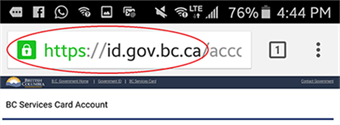
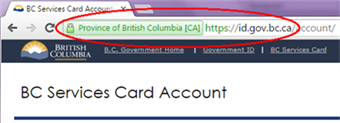
Before logging in with the BC Services Card app, check the top corner of your browser window. You should see a green padlock symbol and https://id.gov.bc.ca. In some browsers, 'Province of British Columbia', might also be displayed. These elements of the website address indicate you have a secure connection to the government login.
If you think you do not have a secure connection, do not continue to login. Confirm the correct address of the government site. Open a new browser session and try again.
These are examples of what a secure connection looks like:
Privacy information
The BC Services Card login process meets strict privacy and security standards.
While you may use your account to access different websites and services, your privacy is still protected.
For example:
- A health care provider will not be able to see your driving record
- A police officer or ICBC employee will not have access to your health records
Report a concern
Contact us about suspicious phone calls, and forward suspicious emails to bcservicescard@gov.bc.ca.
Need more help?
You can find more help in the user guides. If you're not able to find what you're looking for and want to talk to someone, call the Service BC Help Desk.
Service BC Help Desk
Open Monday to Friday (except statutory holidays)